Showing posts with label nokia. Show all posts

Wednesday, 1 May 2013

How to Speed Up s60 mobiles


Friends do u want to get rid of slow speed of symbion mobile and u want better speed than follow the below steps and speed up your mobile...

Steps:

1. First go to your To-do List which may be in organizer or tools in your mobile.
2. Create a note and input as follows

 Subject: Speed

Due Date: 08-29-2012(mm-dd-yy)

Priority: set to High

3. Then press done
4. Now again Create a second Note and input as follows

Subject: Qoukie

Due Date: 08-29-2012(mm-dd-yy)

Priority: set to Low

Then press done

5. Now Mark as done the option ''Speed"

6. Like option 5 also mark as done on option "Qoukie"
7. Now go to main screen and reebot your mobile.

Now enjoy the speed.

How to Watch online TV on s40 and s60 mobiles


It will be very wonderfuk to see live tv on s40 and s60 mobiles, beacuse they are not smart phones, and do not play any online streaming. So from the following method u can enjoy live online tv on your mobile.


Steps:

1. Go to your phones settings.
2. Press configurations.
3. Then press setting.
4. Click on option than add new and choose “My Streaming”
5. Select APN for your own network.. in my case ufone GPRS etc.

6. Now select port as:
 max- 32000 min- 06970
 Proxy disables in all default settings
7. Now save the profile and activate it.

Now go to any mobile site and play live mobile tv.
in my case http://samitv.wapka.mobi/index.xhtml

Enjoy and comment if u like.

Friday, 15 February 2013

Convert Your Mobile into Wireless Webcam


NOTE: There's a Trick at the end of this article. Do read that after reading all this. You will Surely feel good after reading that.

Friends are u get bored from your USB webcam then here is trick for your problem

Steps:
  • First of all visit this site.
  • Choose your Model and  than click download.


It has two components:
1. A client application that resides on the phone.

2. A webcam PC driver compatible with any Windows application that can receive video feeds from a web camera.


How to Install it on Your PC.
Download it from here
Note: Be sure to switch ON the bluetooth of your laptop or PC while installing. 

How to Install on Your Phone?(For Symbian S60 Phones)

Copy the sis file to your Mobile Phone and install it. 

After Installation on Your Phone & PC
After Installing it in your phone, start this app in Phone and PC and connect them.

Connecting Both Devices{Main Step}
This Step Seems to be tough but is not so.Just follow the instructions provided step by step:
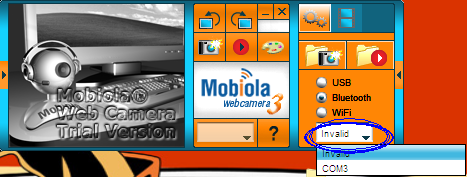
1.Click on the Bluetooth option given there in PC's Mobiola


2.Then select the right communication port there.


If you don't know about the right com port then you can select one by one all ports.Just wait for 2 Seconds after choosing each port and in that waiting period keep your eye at your Phone's display. Unknowingly, when you will select the right Com Port, then your phone will automatically connect with PC Quickly.Webcam will now start automatically.
Not only your Phone will Work as Webcam, you can also see your Phone's Display on your PC & can also take Snapshots.
Now your webcam is always with you wherever you go. Just connect it with your laptop and enjoy.

See the promised trick here

Tuesday, 5 February 2013

How to reset Nokia Lock Code without any software

Friends, in this tetorial i will tell u that how to unlock ur security code of ur nokia mobiles...
Some times u forgot ur security code but from this u can unlock it..

Some phones can also be unlock by iemi but some can not. But dont worry u can unlock by this method.

Steps
!. First of all download the security code hack patch from here
2. extract it.
3. Create a folder on desktop named Recogs on the desktop.
4. now copy the THC-NOKIA-UNLOCK.MDL file to the recogs folder.
5. connect your card to pc throgh the card reader.
6. Open ur sd card from My computer.
7. now go to the system folder. if is hide than type  System.
8. Copy the Recogs folder from desktop to the system folder.
9. Now ejct ur sd card and put in the mobile.
Once you insert the memory card, it will automatically start the unclocker file and resets the Locking code.
its done here....... almost
it succesfully resets your Locking code, it will prompt a message on white screen with, ‘Press a Key’. Press any key and your code is rested to 12345. Now you can change it any time.
Dont forget to say yhanx for yhis imp tetuorial...

Sunday, 3 February 2013

How to know who is on your wifi


Frinds. u know that many of us want to get rid of others peoples on your wifi, and u want to know who they are. Here is software for your this problem.
                            
                            Downlaod here

Thursday, 3 January 2013

How to make your Nokia Phone a Wi-Fi Hotspot

 So do you want to use your Nokia phone as Wi-Fi Hotspot so that you can access internet on different laptops and other portable devices through your mobile phone than tune into this post because we are going to show you how you can make your Nokia Phone into a Wi-Fi Hotspot.
JoikuSpot is an awesome application for mobile phone which makes your Nokia Phone into a Wi-Fi Hotspot.


Features as described on the official website:-

  • With the free Edition your phone turns into an open WiFi HotSpot with basic internet protocol support
  • New simple WiFi Tethering UI connects your laptop or iPad to internet via your phone HotSpot with a click
  • The Light version is 100% FREE with no time limitations. No obligations to get the commercial Premium Ed

Download the Premium Version :