


Monday, 14 January 2013
Make Multiple Facebook Accounts with Same Email
Here are the simple steps from which u can Make Multiple Facebook Accounts with the Same Email Address.
1. Get a gmail account, then Signup for a New Facebook account and add the dot (.) in the email address.
For Example :
Smohsin@gmail.com
smoh.sin@gmail.com
Keep changing the dot (.) position every time you want to create a new Facebook account (e.g : smo.hsin@gmail.com )
Its done now...
Enjoy the trick...

Thursday, 10 January 2013
Activate Zong, Jazz or Ufone Mobile For All Networks
Friends, wo mobiles jin mein sirf 1 sim chalti he. E.g..Ufone, Zong ya Jazz mobile pe sirf 1 network ki sim chalti hai. In pe baqi networks ki sim use krne k liye.
For Example: Aap k pas zong mobile he to Aap us pe sirf zong ki sim hi use kr sakte hain. Is mein dusre Networks ki sims use KR skte he.
Here are the steps...
1. Sim use krne k liye sb se pehle ap apne ufone ya kisi or network ke mobile mein ksi dusre network ki sim insert krein.
Ab type krein
"*#9998*3323#"
It will reset Your phone.
2. Now, Push Exit and Then Push 7, It Will Reset again.
3. Now, Remove Sim and Insert It again. It will say sim lock. Now type.
00000000
It will be unlocked now.
4. Now Type *0141# and Press the green call buttan.
Now Your Mobile is activated for all networks.
THIS COD MAY NOT WORK ON THE OLDER PHONES AND ON SOME OF THE NEWER PHONES.
If it dose not work, You will have to reset Your phone without a sim in it by typing.
*#2767*2878#
OR
*#9998*3855#
Note: Ye sab procedure k liye dukan dar Rs.300 se Rs.500 tk le laite hain
Don't forget to say thanks..
How to Send Multiple Friend Requests in one click on Facebook
Frendz you can now send request to many fb friends in one click..
Here are the steps.
STEPS:-
1. Press the "Find Friends" tab along the blue menu bar at the top of any Facebook page.
2. Click on the "Find Friends" link on the right side of the account you want to import contacts from. For instance, if you press "Find Friends" on the Skype link, it opens a box and asks for your Skype username and password. Click on the "Find Friends" blue button under that information to connect to that account.
3.Click the "Agree" button that pops up to agree to share the contact information between accounts and then follow the prompts to import your contacts.
4. Check the box next to the names of the people you want to invite from the imported list and press "Send Invites."
I think u enjoy this tip...
COMMENT????

Sunday, 6 January 2013
How to hide a user account in Windows 7???
CAMERA ICS+ V1.2C APK

Android OS / Varies with devices
Overview:
Camera ICS is an improved version of the official Camera app included on Ice Cream Sandwich (Android 4.0).
We have also added support for Honeycomb (Android 3.0) tablets.
NEW FEATURES
- Color effects (mono,sepia,negative,...)
- Silent mode (no shutter sound)
- Picture quality setting (low/medium/high/ultra)
- Video bitrate selection (normal/2x)
- Video stabilization on/off (only 4.0)
- 720p face effects (only 4.0)
- Panorama mode and time-lapse video on Honeycomb tablets.
What's in this version:
- v1.2
- Timer
- Volume keys: Burst mode
- Guidelines (3x3 matrix)
- Improved SGS2 camcorder audio quality
Install Android 2.1 UI on Nokia S60v5 mobile
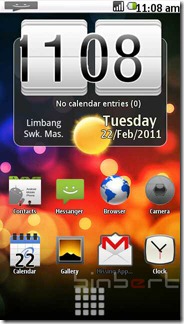
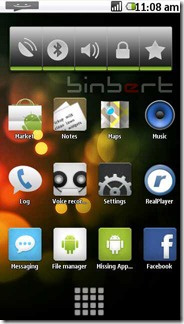
I was searching for a solution to run android on my Nokia 5230. I found some YouTube videos with tag Android and Nokia. After a long search I found some solution to tweak the user interface of Nokia with an Android. Here are the steps to change Nokia UI to an Android UI on Symbian 60V5. Remember this will change only the User interface. You can always uninstall.
1. Download GDesk.rar from here
(This app is signed if it not work...Do the methog given below)
2. Extract and rename the folder as “+GDesk”
3. Copy “+GDesk” folder to your phone memory
4. Go to +GDesk\Gdesk v0.33g Install SIS And install all applications, files listed below
GDesk.0.33g.SIS
GDeskAgnViewS60.0.33g.sis
GDeskClockS60.0.33g.sis
GDeskInfoViewS60.0.33g.sis
GDeskNotepadS60.0.33g.sis
GDeskShortcutsS60.0.33g.sis
GDeskTaskManS60.0.33g.sis
- Normally Your Phone will not allow you to install GDeskTaskManS60.0.33g.sis. It will give following error Certificate is expired
- You have to sign the application and install it.
- How can you sign an application? Generate a certificate using this site and sign it....
Or try a self signing application using application called FreeSigner
5. Now run GDesk from your installed applications.
6. Tap your screen, then click on Design >> Load Design
select Android 2.1.gdd from your phone
Location : Memory card\+GDesk\Android 2.1.gdd
7. Now go to options and tick following option for better result
Replace Main.
Full Screen.
Hide title caption.
Disable menu tap.
It is compactable with Nokia 5230, 5800, 5235 and 5233...
Enjoy...
DONT FORGOT TO GIVE COMMENT
App 2 SD(App to SD Card)
Help you to save your memory(internal phone storage).
FEATURES:
1. Show apps on SD Card
2. Show apps on Phone.
3. Move applications from phone to SD Card.
4. Move applications from SD Card to phone.
5. Show available memory and total memory.
6. Open/Uninstall apps.
v1.2
1.Sort by name
2.Sort by size
3.Show icon on notification bar when a new app has been installed
DOWNLOAD HERE
Thursday, 3 January 2013
Lookout Paid Version For Android

SCREEN SHOTS:--


Lookout keeps your tablets and phones, and everything on them, safe and secure.
Lookout offers essential protection against all the bad stuff that can happen to your phone or tablet, like viruses, loss, and theft.
Lookout’s security features are FREE, but for complete protection, upgrade to Lookout Premium for $2.99/month. All downloads include a FREE two-week trial of Lookout Premium with no credit cardcredit cardcredit card required. At the end of the trial you can keep the free version of the app to use for as long as you like.
* Remote Lock & Wipe: Securely lock your phone if it's lost or stolen to prevent others from accessing your phone and remotely delete sensitive data on your phone if needed.
* Privacy Advisor: Identify which apps can access your sensitive data like contacts, location, SMS text messages & identity info.
* Advanced Backup: Backup and restore photos and call history in addition to contacts. Restore them to a new device.
DOWNLOAD HERE


