Showing posts with label Iphone. Show all posts

Saturday, 30 March 2013

Unlock Huawei E1550 3G USB modem


USB modems are always locked by the mobile connection provider. They cannot be used with any other service providers. If you want to switch your service provider then you must buy a new USB modem which can be costly affair.
However, you can unlock these USB modems and you can then use them with other service provider connections also. Here is a quick guide to unlock Idea Huawei E1550 netSetter.


Steps to Unlock Idea Net Setter


  • Insert You idea netsetter with default sim (which u got with netsetter)


  • Install Huawei frimware E-1550For idea india
  • After successful installation, unplug your modem and insert a sim (airtel/bsnl or any other)and replug the modem and install the driver and install the driver and software

  • open the software and enter the unlock code when it asks usingUniversal master code (you can download it from here)
    now your modem is completely unlocked
    then create a profile for current sim from Tools menu and set corresponding APN for the sim.


    APN 
  • Aircel APN: aircelgprs | Access Number: *99***1#
  • Airtel APN: airtelgprs.com | Access Number: *99#
  • Tata Docomo APN: tata.docom.internet | Access Number: *99#
  • Idea APN: internet | Access Number: *99#
  • Reliance APN: rcomwap | Access Number: *99#
  • BSNL 3G APN: bsnlnet | Access Number: *99#
  • MTNL 3G Postpaid APN: mtnl3g | Access Number: *99#
  • MTNL 3G Prepaid APN: pps3g | Access Number: *99#
  • Vodafone APN: www | Access Number: *99# 

Mobile Partner  can be used instead of idea softwae

Galaxy S3 Dandelion Live Wallpaper Free Download


Friends, now enjoy galaxy S3 wallpaper on your android phone and enjoy with the wallpaper.. Your android phone will look like the samsung galaxy s3 mobile. So just download the apk file and install it on ur mobile.


Tags:-
SamsungGalaxyS2,SamsungGalaxyS,SamsungGalaxyS2,GalaxyS,SamsungGalaxy551,GalaxyCinemas,SamsungGalaxyReview,GalaxyPhon,SamsungGalaxyApps,SamsungGalaxyMobile,GalaxyTheaters,SamsungGalaxySApps,GalaxySReview,GalaxyEntertainment,LaGalaxyTickets,NewGalaxyPhone,GalaxyApps,GalaxyMovieTheater,GalaxySApps,GalaxyAlarm,


Sunday, 24 March 2013

Update iPod Touch to Firmware OS 3.0


Apple has release iPhone and iPod Touch firmware OS software version 3.0. The firmware 3.0 is a major update that adds tons of new features to the portable device. While all generations of original iPhone and iPhone 3G entitles to free upgrade to iPhone OS 3.0 software update, both 1st generation and 2nd generation iPod Touch 2G is required to pay $9.95 to upgrade to to OS 3.0.

Bypass and skip the payment to Apple. It’s obviously unfair practice by Apple towards iPod Touch, who properly do not incur recurring charges. Use the following guide on how to upgrade and update to iPod Touch OS 3.0 software update firmware for free without cost.

How to Upgrade or Update iPod Touch to OS 3.0 Firmware For Free

1. Download and install iTunes 8.2 or higher version.
2. Download iPod Touch 2G OS firmware 3.0 Apple Device Software Update
iPod2,1_3.0_7A341_Restore.ipsw or iPod Touch 1G OS firmware 3.0 Apple Device Software Update IPSW file, iPod1,1_3.0_7A341_Restore.ipsw via the iPhone OS 3.0 software update direct download links.

Note: If the downloaded file is in ZIP format (iPod2,1_3.0_7A341_Restore.zip) , then rename the extension from .zip to .ipsw. If the file name is been appended with .zip extension, such as iPod2,1_3.0_7A341_Restore.ipsw.zip, just remove the .zip off the filename.

If you encounter “an error occurred while processing your request” error message when attempting to download iPod Touch firmware, download the IPSW files from here (for 1st generation iPod Touch) or here (for 2nd generation iPod Touch).

  • Plug in and connect the iPod Touch to computer.
  • Run iTunes 8.2 or higher.
  • Select the iPod Touch from Devices list.
  • Optional but recommended, take a backup of the iPod in case of accidental file lost.
  • Now there are two ways to update iPod Touch. For user who want to clean and fresh upgrade the iPod Touch, without retaining any existing songs, musics, videos, movies, apps and other media or data files on iPod Touch (mean you will be losing all files stored on iPod Touch), follows these steps:
  • In Windows environment, press and hold Shift key and left click Restore.
  • In Mac OS X system, press and hold Option key and left click Restore.

For user who want to retain and save everything that has been uploaded and stored on iPod Touch or ensure that the media is untouched (not losing any files), follow these steps instead:

On the iTunes main screen, there should be 2 options: “Check for update” and “Restore”.
 Click on Check for update.
A web page showing the iPod Touch OS firmware 3.0 features and offering option to buy for $9.99 will be loaded and shown. Click on Cancel.
iTunes will return to the previous iPod Touch main page. However, the “Check for update” option has now been change to “Update.
In Windows environment, press and hold Shift key and left click Update.
In Mac OS X system, press and hold Option key and left click Update.

Locate and select iPod Touch OS 3.0 Apple Device Software Update IPSW file downloaded in step above.
The update process will start. iPod may reboot a few times. Do not disconnect iPod Touch until iTunes has completed updating iPod Touch.
Once upgrading is done, the iPod Touch will be on OS firmware 3.0, for free without any cent been paid.
Optionally, if you have choose to restore iPod Tunes to firmware OS software 3.0 at factory default, iTunes will offer option to either create a new iPod or restore it from backup. For user already created a backup of iPod, just restore the date files to upgraded iPod Touch. 


Note: If there is an error when iTunes attempts to recognize iPod Touch, just unplug and plug the iPod back in again.

Monday, 4 March 2013

Top 4 applications for wifi hacking in iPhone

Friends, here are top 4 applications for wifi password cracking in iPhone../


1. Aircrack-ng for IPhone:
It is the simple command line with
graphical interface software which is used
to crack wifi networks . It sends packets
to the wifi network and then cracks the
password file of the network .It is used
widely and can be downloaded from here .


2. IWep Lite:
It is an Iphone applications which let you
crack wifi network in less than 30
minutes . It is easy in use and can be
understood easily rather than Aircrack-
ng . It is Graphical interface with best
utility and dictionary . Apart from Aircrac-
ng it uses dictionary and so it is less
trustworthy than Aircrack and can not
crack every key. It is used more widely
than Aircrack but it uses dictionary that's
why it is on 2nd number. It can be
downloaded from here .


3. WepGen:
WepGen is just another application which
cracks the Wifi network by sending
packets and it is rather easy in use than
Aircrack but though it is on 3rd number
due to it's popularity. It can be
downloaded from here .


4. IWifi Hack:
It works on the same scene as other
cracking softwares except iweplite means
it sends packets and break in the security
of a wifi network . It is easy in use and
can easily be used by anyone. It can be
download from here .


Till now I hv searched only this which are 100% working, I will search for more..
If u know more tell me through comments.

Saturday, 2 February 2013

How to check whether your Pen Drive is Orignal or Not


Friends, you store your files, music, videos and much more in your pendrive or SD card. But u dont know that whether it is orignal or not. 
Now here is a software for your yhis problem.

Screen SHot:

                                Download here

Monday, 10 December 2012

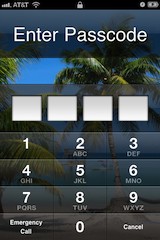
Forgot an iPhone Passcode? How to reset the iPhone passcode


reset iphone passcodeBypass & Reset the iPhone Passcode


If you forgot your iPhone passcode you can bypass the lock screen completely and reset the passcode by using iPhone recovery mode.
Warning: This will require you to restore your iPhone or iPod touch, this means you’ll lose all data on the device and be back to factory settings.
  1. Disconnect the USB cable from the iPhone, leave the other end connected to your Mac/PC
  2. Launch iTunes
  3. Press and hold the Home and Power button on the top of the iPhone to turn off the device
  4. Press and continue to hold the Home button while you reconnect the USB cable to your iPhone, this will cause the iPhone to turn on
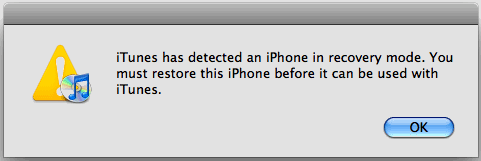
  5. Continue to hold the Home button until an alert message in iTunes appears that an iPhone in recovery mode has been detected

iphone recover mode detected
Now that the iPhone is in recovery mode, you must restore the device:
  • From iTunes, look under the “Summary” tab
  • Click on the “Restore” button within iTunes
This will wipe all files, settings, and apps from the iPhone, including the passcode. When the restore is finished, the iPhone will be at the factory settings. At this point you can choose to start from scratch or to restore the iPhone from a backup.
This tip came from an iPhone repair shop, where it’s common for people to bring in a phone for fixing and then forget to provide the passcode.

Tuesday, 4 December 2012

Discover New Cuisines with Ness

Ness


We may all feel a brief prideful moment when the server of our regular culinary establishment commits both our faces and regular order to their mind. This elation lasts none too long in the face of the impending thought that we really ought not to be so routine. However, the monetary gamble on a new restaurant could not only ruin your wallet, but your digestion system as well. We rarely feel compelled to take such a risk. The Mobile App of the Week, Ness, hopefully helps you make better gastrointestinal gambles.

Ness describes itself as the "Pandora of restaurants," which I found to be an appropriate description. Upon opening Ness for the first time, Ness asks for your regular location, and your rating of restaurants in the area. Ness requires 10 ratings to begin doling out recommendations.
Once you pass your judgment on the surrounding diners, Ness brings you to the home screen. The home screen comprises of a search bar and enticing pictures of several Hors d'oeuvre genres in the background. Touching a picture shows you recommended restaurants of that kind in the area. For example, poking a picture of a burger gives you the burger joints in your area.
The search bar lets you find restaurants by type, price, location, and hours. On restaurant listings, Ness will even tell you if a location is about to close or already closed. All of this makes finding a choice eatery simplistic.
Ness allows you to log in with your Facebook or Foursquare account, apparently to help locate good eats. How social media could possibly help eludes me.
Overall, whatever system Ness uses works terribly well. As a test I gave ratings of a couple places I ate at while leaving out my favorite ones. Ness's top recommended restaurants were all places I left out but thoroughly enjoyed.
Regrettably, this app does not come in Android flavor.

Ness — The Free iOS App of the Week
For iPhone
Size: 10.2 MB
Download: 


Find a Whole New Library with Wattpad


WattpadWattpad
Writing tends to be a lonely pursuit. Skilled writers enjoy feedback from a source besides the niggling voice in their head. However, finagling an individual into critiquing your epic work requires them to A) actually read, which a vast percentage loathe to do, and B) enumerate on their thoughts more than "it's good." Finding colleagues seems to be just as difficult as finding feedback. Many self-proclaimed "writers" end up having only written one badly spelled poem in middle school.

This app of the week, Wattpad, solves the solitary writer's conundrum. Wattpad acts as a much needed online community to amateur writers as well as a source of thousands of books to avid readers.
For the readers, Wattpad offers books of all genres. Selecting a book will download it to your Wattpad library to be read at your discretion. I found the functions of the reading mechanic simple. Tap to the right of the screen to go to the next page, and tap the left of the screen to go back a page. You can also have the text slowly scroll down Star Wars style if you don't feel like using you hands.
After you've (hopefully) enjoyed your read, you can share the story through eMail and Facebook. Additionally you may upvote and comment on the story. Most authors respond to the feedback you give.
To comment, upvote, or create a story, you must fashion yourself a Wattpad account. Wattpad gives the option of logging in through Facebook, but you do have an option to just make an independent account. If you particularly enjoy the works of a certain author you can become a "fan" of them so you may be updated on their newest works.
On the writer's side, Wattpad gives you a sizable amount of readers eager to look at your works and provide feedback. Upon choosing to create a new story, Wattpad provides you with a minimal creation page; a slot to insert the title, and a slot to insert the text of your novel. After creating your story, you may upload it to the Wattpad database.

Wattpad — Free Android / iOS App of the Week
For Android
Size: 1.7 MB

For iPhone and iPad
Size: 4.2 MB

Find the Best Roadways with Waze


Waze App IconWaze
Before the information age, the only communication occurring between drivers were the occasional crude gestures or the apologetic hand-waves proceeding cutting someone off. However, with our modern mobile technology we can achieve something greater. Waze (or Waze Social GPS Traffic & Gas), the Free Android / iOS App of the Week, allows us to correspond with other drivers to circumvent the road born hazards which seek to tardy us.

The main page of Waze is a GPS map overlaid with icons indicating various points of interest on the road. Most of the icons are pretty self explanatory. If you don’t want to scroll around your area to discover what’s happening you can view a list of all the reported incidents in your area. A few of the most common warnings include: traffic cameras, police, low-speed areas, and other Waze users.
In fact, you can unlock new looks for your own Waze user icon by contributing to hazards in your area. Reporting hazards proves to be a quick process. It has to be: no one looks forward to tediously typing out "goat crossing" when hurtling at 70 mph. Select the icon on the right hand corner, choose your flavor of hazard type, and Waze will do the rest. If you desire to add more information, the option exists.
Waze also provides you with their own navigation system. The navigation system takes into account the reported incidents along your route and will suggest alternate routes if available. The navigation is voice-guided which provides a nice improvement on… other map systems. However, if you want to get directions on the fly, make sure you can acquire the address of your destination as Waze isn’t always great with names.
Waze, titling itself as a social media tool, also gives options to meet up with other users or talk with them. An opportunity I didn’t take up as I had little interest in pinging off where I live.

Waze Social GPS Traffic & Gas — Free Android / iOS App of the Week
For Android
Size: 14 MB

For iPhone and iPad
Size: 27.9