Showing posts with label Symbion. Show all posts

Wednesday, 1 May 2013

How to Speed Up s60 mobiles


Friends do u want to get rid of slow speed of symbion mobile and u want better speed than follow the below steps and speed up your mobile...

Steps:

1. First go to your To-do List which may be in organizer or tools in your mobile.
2. Create a note and input as follows

 Subject: Speed

Due Date: 08-29-2012(mm-dd-yy)

Priority: set to High

3. Then press done
4. Now again Create a second Note and input as follows

Subject: Qoukie

Due Date: 08-29-2012(mm-dd-yy)

Priority: set to Low

Then press done

5. Now Mark as done the option ''Speed"

6. Like option 5 also mark as done on option "Qoukie"
7. Now go to main screen and reebot your mobile.

Now enjoy the speed.

How to Watch online TV on s40 and s60 mobiles


It will be very wonderfuk to see live tv on s40 and s60 mobiles, beacuse they are not smart phones, and do not play any online streaming. So from the following method u can enjoy live online tv on your mobile.


Steps:

1. Go to your phones settings.
2. Press configurations.
3. Then press setting.
4. Click on option than add new and choose “My Streaming”
5. Select APN for your own network.. in my case ufone GPRS etc.

6. Now select port as:
 max- 32000 min- 06970
 Proxy disables in all default settings
7. Now save the profile and activate it.

Now go to any mobile site and play live mobile tv.
in my case http://samitv.wapka.mobi/index.xhtml

Enjoy and comment if u like.

Saturday, 9 March 2013

Make Free Calls Around the World to any Number..[Pics Guide]{100% fully tested}


   How to make Free Phone calls from your PC to any Mobile or Landline phone in the World". Its absolutely free i.e 100% free. So guys read on....     
Steps
1.Visit Friencaller site
2. Register a account there              
3.Then go to your email and confirm your account.

4. Download FriendCaller from here.

Friendcaller.com, is a browser-based Internet based calling solution that offers an free, instant peer-to-peer connection. Since the application was launched, nearly 100000 users have found out how easy it is to establish a connection from home

Now login with your account.


Then click on the phone icon.           


Now comes the great part. Download a software called Cheat Engine from here.

Run the software and click on "Open Process".


Then click on window list.


Select friend caller, and open it.


Now dial number in friend caller. [First test your own number] and click call.
                                 
It will start ringing..
                                                          

Now in Cheat Engine, enable speed hack. Edit speed to 0.00


Now enjoy your call. The timer will freeze. You can talk as much as you want. When you finish call, you will be only charged 0.02 but after your balance is finished, make new account and enjoy.

Friday, 15 February 2013

How to use free internet on ufone


Assalam o Alaikum!
Frinds Today I came with wonderful trick
"How to use free internet on ufone???"
As the name suggest am going to tell you how to use free internet on ufone
For this purpose you have activated mms gprs on
your ufone SIM. You can check VAS Details from this code.
 *336*1*5#
Now Set your connection according to this configration:
  
  • APN                 :Ufone.Pmms
  • Proxy                :172.16.13.26
  • Port                   :8080
  • Primary dns       :8.8.8.8 
  • Secondry dns    :8.8.4.4
No need for balance for the first activation use with zero balance...
Plz share this trick to your friends thanks............

Convert Your Mobile into Wireless Webcam


NOTE: There's a Trick at the end of this article. Do read that after reading all this. You will Surely feel good after reading that.

Friends are u get bored from your USB webcam then here is trick for your problem

Steps:
  • First of all visit this site.
  • Choose your Model and  than click download.


It has two components:
1. A client application that resides on the phone.

2. A webcam PC driver compatible with any Windows application that can receive video feeds from a web camera.


How to Install it on Your PC.
Download it from here
Note: Be sure to switch ON the bluetooth of your laptop or PC while installing. 

How to Install on Your Phone?(For Symbian S60 Phones)

Copy the sis file to your Mobile Phone and install it. 

After Installation on Your Phone & PC
After Installing it in your phone, start this app in Phone and PC and connect them.

Connecting Both Devices{Main Step}
This Step Seems to be tough but is not so.Just follow the instructions provided step by step:
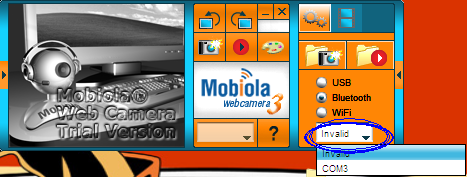
1.Click on the Bluetooth option given there in PC's Mobiola


2.Then select the right communication port there.


If you don't know about the right com port then you can select one by one all ports.Just wait for 2 Seconds after choosing each port and in that waiting period keep your eye at your Phone's display. Unknowingly, when you will select the right Com Port, then your phone will automatically connect with PC Quickly.Webcam will now start automatically.
Not only your Phone will Work as Webcam, you can also see your Phone's Display on your PC & can also take Snapshots.
Now your webcam is always with you wherever you go. Just connect it with your laptop and enjoy.

See the promised trick here

Convert Mobile Phone into WiFi Hotspot


Guys, have u internet connection on your mobile and u dont have internet connection on your PC or laptop.
So Here is a trick from which u can make your mobile phone as a hostspot.

Steps:

  • Download the app from here or here
  • Connect your laptop or iPad to the Internet using your mobile phone as a 3G WiFi Router. JoikuSpot turns your phone into a WiFi HotSpot
  • Enjoy new easy 1-click WiFi Tethering user interface
  • Have complete freedom of naming your HotSpot, full connection security and full feature set with all internet protocols supported.


How to Use Joikuspot

  • Install this file in your cell phone.
  • Then Run it.
  •  Then it will act as Wifi Modem and you can check for a Wifi Connection in your Other Wifi Device for this Wifi connection.
  •  It's name is Joikuspot_somecode(We can't change its name in Free Version) and in my pc it shows like this


Note: This application will ONLY work in the following Handsets:

N8, E7, C6-01, C7, E51, E52, E55, E60, E61, E61i, E63, E65, E66, E71, E72, E73, E75, E90, N78, N79, N80, N81, N81 8GB, N82, N85, N86, N91, N93, N93i, N95, N95 8GB, N95 Americas, N95 8GB Americas, N96, N97, N97 Mini, 5530 XpressMusic, 5630 XpressMusic, 5730 XpressMusic, 5800 XpressMusic, C5-03, C6, E5, X5, X6, 6710 Navigator, 8800 Erdos, E6, X7, 702T, T7, Oro, Nokia 500, Nokia 600, Nokia 700, Nokia 701, Nokia 603.