Showing posts with label Facebook tips. Show all posts

Sunday, 21 April 2013

Take screen shot of any site


Friends, do u want to take screen shot of any site than follow steps

1. Go this site..
2. Copy link and paste it in site and click on get image..

Friday, 12 April 2013

Post Facebook status Upside Down


Friends, in this facebook trick u can impress ur friends and shock them. When they will see the upside down status than they will ask u how do u do it.... Than u become happy..
So friends, here is a trick...

Steps


  1. First of all go to this site
  2. Type Your text which u want to flip.
  3. Now copy that text and paste this where ever u want.
Enjoy....

Sunday, 24 March 2013

How To change Facebook account Password Without Knowing Current Password


What if by chance you get a facebook user account who has not logged out from his/her email id. O r u have successfully sidejacked an account or got into account with cookie logging.

You can take advantage of this golden opportunity and change his/her facebook email id password without even knowing his current password. This would help you to login in the id whenver you want.

Here are some simple steps to follow to change the password without even knowing the current passwords.

Step 1. Click the link and open it in new tab in your browser.


Now Click To Continue


Just fill up the New password and confirm password and hit continue.


Hurrah.. you just changed the password.


Enjoy and have fun :D

Thursday, 7 March 2013

How to Send Request When Blocked With Extension


Bypassing the 'This Request Can't Be Sent' error on Facebook to send Friend Requests

Friends, for a long time i was finding about this trick But today is the special day that i have founded this trick and i m sharing it with u... I hv already searched about that and posted it in my blog but in that post we have to know the email id of that person which u want to send requests.....But this trick is awesome.

Steps To do:

1. Install tamper data addon or extension
* For Firefox    * For Chrome

Okay Lets start Now the Trick...

Note: It is so necessary that your friends request are blocked.
2. After insatlling add-on, In your Firefox browser go to 'Tools' menu and under that you will find 'Tamper Data' 
In google chrome go to settings at top right corner Tools> extensions.


3. Now, hit the 'Start Tamper' button. As your Tamper Data has started, its time to get back the 'Send Request' pop-up. Now, you can click on 'Send Request' button. After pressing that you will get another pop-up, and this time from 'Tamper Data'. 


Hit the 'Tamper' button. Make sure that the URL that you get is similar to what you see in the pic above. 


4. Now you will come across the above pop-up in which you have to do some modifications. As you can see, the highlighted option 'Submit' has the value '1' by default, you have to change it to '0' and press 'OK'

After you pressed the 'OK' button, you will be headed towards another pop-up saying 'Change content-header....' you have again press 'OK' and after you pressed this last 'OK' your Friend Request will be sent. Its almost done here


Follow the Instructions as shown and click the OK button..


If or when any other “Tamper with request” screens popup while you’re in the middle of editing the above data, just click the “Abort request” button on it to get it out of your way.
Once you click the OK button on the edit screen you’ll see a popup dialog Box, just click the OKbutton..
This needs to be done to keep all data proper before it’s sent..
Once you OK the Content Length dialog, you should see a pop up Box, as if you were never blocked from sending the facebook friend request...
If you get the original “This request can’t be sent” screen again, just do all of the steps over again..!!
You may have to do it a few times until it works. Eventually it will..!!
And that’s all there is to it!!
For more click here

Saturday, 2 March 2013

Sign in to many Facebook Accounts in same Browser


Friends, U can Now EnJoy with many Facebook accounts in the same browser. I know todays guys like me hv many FB accounts and u want to enjo the all FB accounts. So i Searched about it and now i m sharing this with u. In my old post i told u ab8 injectendo window in which u can enjoy only 2 accounts. 

Here are the steps:

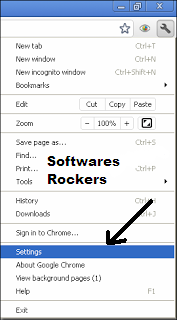
1. Go to settings as the given picture.

 2. Click on ADD NEW USER

3. Type ur name.

4. After typing name Click on Create
 Now A new window will open. U can Sign in to that browser to enjoy ur others FB Accounts
Like this add many users as u want.... And Enjoy Fb..
Now Like my Page...

Friday, 22 February 2013

Facebook Chat Tricks New


Friends, u can now send words to your friends in a different way for impressing them, So here is a trick from which u can do that

 Codes of A-Z for Facebook chat:-

Below are codes of A-Z which you can use in facebook chat. You can create your on words with this codes.

[[107015582669715]]  = A
[[116067591741123]]  = B
[[115602405121532]]  = C
[[112542438763744]]  = D
[[115430438474268]]  = E
[[109225112442557]]  = F
[[111532845537326]]  = G
[[111356865552629]]  = H
[[109294689102123]]  = I
[[126362660720793]]  = J
[[116651741681944]]  = K
[[115807951764667]]  = L
[[106596672714242]]  = M
[[108634132504932]]  = N
[[116564658357124]]  = O
[[111669128857397]]  = P
[[107061805996548]]  = Q
[[106699962703083]]  = R
[[115927268419031]]  = S
[[112669162092780]]  = T
[[108983579135532]]  = U
[[107023745999320]]  = V
[[106678406038354]]  = W
[[116740548336581]]  = X
[[112416755444217]]  = Y
[[165724910215]]        = Z
       
 How to use this codes
First think wat word you want to create then pick up codes of that alphabate from above codes
Let us create hi . So pick up codes of H and I .
After that enter this in chat box  [[111356865552629]]  [[109294689102123]]. Like the below image

Now it will look like this

Note: Make sure there is space in between any two codes or else it will not work.

U can also make other worlds like following:

[[115927268419031]] [[116564658357124]] [[109225112442557]] [[112669162092780]] [[106678406038354]] [[107015582669715]] [[106699962703083]] [[115430438474268]] [[115927268419031]]    
[[106699962703083]] [[116564658357124]] [[115602405121532]]  [[116651741681944]] [[115430438474268]] [[106699962703083]] [[115927268419031]]

Friday, 15 February 2013

How to Send Friend Request in facebok when blocked


Friends, sometimes u get some difficulties in facebook like friend request and others so much. so here is a trick for sending friend request to your friends when it is blocked for 3, 7, 14 ,3 days. U can send thousands of friend request by this trick.

Steps

1. Open notepad.
2. Add all the emails separated by commas ( , )

3. Now save that file with the extension contact.vcf Now, this new file is your contact file.


4. Go Here 

5. Click On Other Tools


6. Upload Contact File 


You will be prompted to send friend request. 
Click 'OK' and that's it, you're done

Dont forget to like my page!!!!!

Create facebook Chat codes

Friends, here is the coolest trick for impressing your friends. U can send your pictures in the form of codes by this trick.

Steps

  1. First of all visit this site.
  2. Than choose your picture from ur Pc.
  3. Now upload your photo.
  4. After sometime a code will appear in a box.
  5. Copy that code and paste it in the facebook chat and impress your friends.

Friday, 8 February 2013

Send Automatically Birthday wishes to your Facebook Friends


Friends, sometimes due to some reason u can't send birthday wishes to ur friends, But here is a solution

Steps:
  1. First of all log into your Facebook Account.
  2. Visit the website.
  3.  Now Click on CONNECT WITH FACEBOOK. 
  4. Now it will run a app , Allow the application to post.
Now u will see below pic

5.  Now on right side there will be drop down box.
6. Click on Write Message.
7. Click Happy Birthday.
8. Now save it.
 Now it will automaticaly Send birth day msg to ur friend on his Birth day date.

Wednesday, 6 February 2013

How to know who Unfriends you on facebook

Friendz, today im telling u a very important trick.
Sometimes, your fb friends unfriend u but u dont know who unfriend u.
Here is the solution guyz.

Steps To Do:-
1. 1st of all visit this site.
2. Skip add.
3. Now u r in the site.
4. Tick Here To use this servise you have to accept the Terms of Use 
5. Now it will access your facebook account.
6. Log in to u ur account.
7. press allow.
Now the site will show ur friendz and peoples who unfriends u.

Saturday, 2 February 2013

How to send SMS throughFacebook For Free to anyNumber

Friends, today I am sharing a very important trick.
U use many sites like fun92.com etc
But from today u can send free SMS through fb.
Steps:-
1. First of all Login to your Fb Account and
Go to a fb Application named ChatSMS
2. Now there will be a page open.
3. Now select your country.
4. Type the number u want to send Msg.
5. Now click send
It's done now...
Enjoy...

Thursday, 10 January 2013

How to Send Multiple Friend Requests in one click on Facebook


Frendz you can now send request to many fb friends in one click..
Here are the steps.

STEPS:-

1. Press the "Find Friends" tab along the blue menu bar at the top of any Facebook page.

2. Click on the "Find Friends" link on the right side of the account you want to import contacts from. For instance, if you press "Find Friends" on the Skype link, it opens a box and asks for your Skype username and password. Click on the "Find Friends" blue button under that information to connect to that account.

3.Click the "Agree" button that pops up to agree to share the contact information between accounts and then follow the prompts to import your contacts.

4. Check the box next to the names of the people you want to invite from the imported list and press "Send Invites."
I think u enjoy this tip...
COMMENT????

Sunday, 2 December 2012

How To Know Who Unfriend You On Facebook?


Hello Friends!! Good Morning .Today Facebook is the largest social networking site. Almost everyone who uses Internet are having Facebook account.So taught to start posting some tricks and tips on my blog about    Facebook so that your social networking skills could develop and you will have good online Friends.Guys remember one thing don't accept a friend request from an unknown people on Facebook cause they can be  psychic who will post abusive things on your wall or may be an hacker who will take your personal information for any destructive purpose.

How to Know Who Unfriend Us ?


So friends as we all know that Facebook does not provide information about who unfriend us and who have visited our profile ? and we all are curious to know these things because it seems to be quite annoying that someone has unfriend us so i am going to tell you the way to recognize who have unfriend / blocked us.

Instruction:

I am going to tell you one applications to know who unfriends you on Facebook.


Follow these steps:

1.Goto Facebook Unfriend Finder. this an Facebook application like poker, Birthday reminder, etc

2.Select your browser and follow the steps in it.

3.After installing it will show the unfriends button in the left sidebar in firefox.

4.In Google Chrome it will be installed as a extension.

5. Now you can know who have unfriend you........ so now you can know who is your good buddy who is the bad one?

Don't Forget to Like us on Facebook and Invite your Friends too to Like us, Your Like's are inspiration to us and Also Comment about the posts.